Anthropic launched Personal Finance in Claude on 5 November 2026, and the idea is simple: link your bank and card accounts, then ask Claude where your money went in plain language. It is a beta rolling out gradually this week to Pro, Max and Ultra subscribers in the US, connecting through Plaid with read-only access. Claude can read your balances and transactions. It cannot move a dollar of your money. The part worth understanding before you link anything is the boundary around your data, because Claude can be wrong, and its totals are only as complete as the accounts it can read.
What can Claude actually see in your accounts?
For each account you choose to connect, Anthropic publishes exactly what Claude gets: the bank name, the account name and type, the last four digits, balances and credit limits, and up to two years of transactions. Each transaction carries its amount, date, merchant, category and the bank’s own description. Anthropic’s Help Center says you can link up to 16 banks, including credit card, loan and investment accounts.
For investment, loan and card accounts, Claude reads balances and credit limits only, not holdings, trades, interest rates or loan terms, so it can tell you what you owe and what you spent, but not analyse a portfolio it never sees. One edge case: Plaid normally passes only the last few digits, but if a bank writes a full account number into an account name or a transaction description, Claude may see it there.
Our calculation puts that window in one number: 16 banks times 24 months is up to 384 bank-months of transactions in theory, if every link carried the full two-year history.
What can you ask it to do?
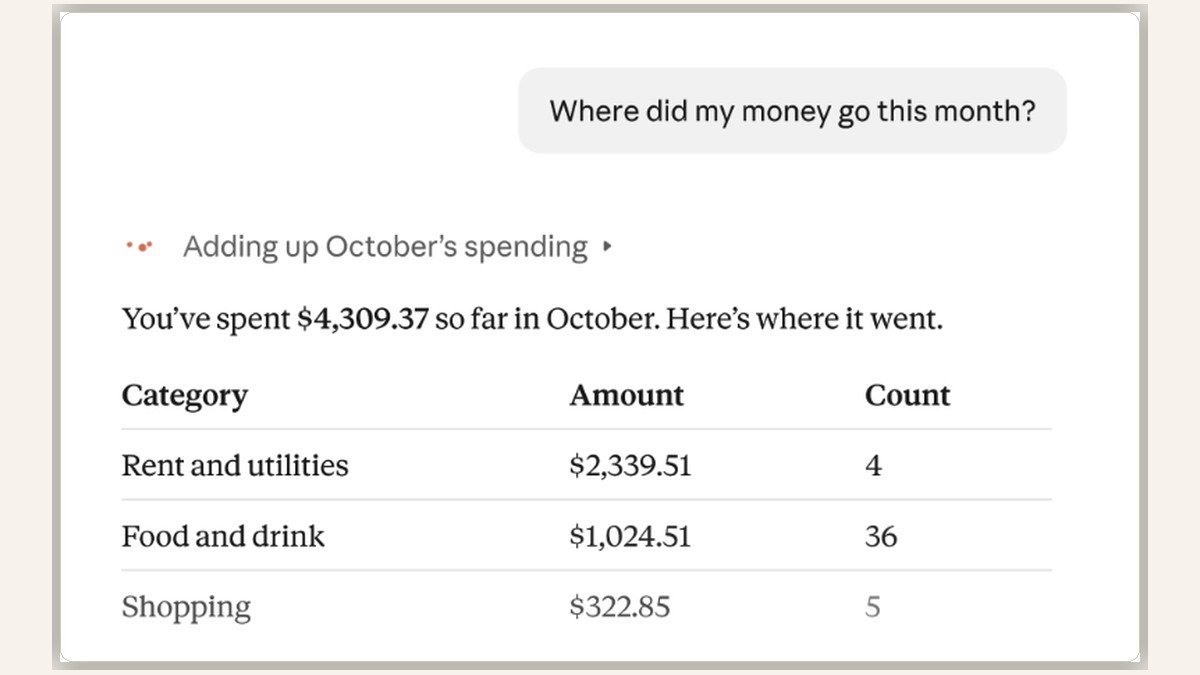
Start with the question Anthropic uses in its own demonstration: “Where did my money go this month?” Claude adds up spending across the accounts you connected and sorts it by category. In the worked example, the month totals $4,309.37, with more than half going to rent and utilities and $1,024.51 to food and drink. Follow-ups such as “Is that more than usual?” lead to a membership renewal flagged, four payments due before payday, and $1,393.22 left. Those are Anthropic’s demonstration figures, not independent test results, but they show the shape of the product: totals first, then the follow-ups that make a total useful.
Beyond the monthly summary, Anthropic says that if you ask whether anything looks off, Claude reads across every account you have connected and can point to what is easy to miss, like charges that hit twice, unexpected fees, or a bill that has crept up all year. You can ask bigger questions too, such as whether you are spending more than you make, or what an APR is and how much interest yours has cost you this year. Ask for a weekly spending chart, a calendar of what is due, or a dashboard of your chosen numbers, and Claude builds one you can keep adjusting.
What it cannot do, and where its answers can go wrong
The hard limits are stated up front. Personal Finance cannot move, manage or invest your money. It cannot transfer funds, pay a bill or place a trade, and Anthropic says it is not designed to give investment advice. For bigger money decisions, Anthropic is exploring how Claude could work alongside licensed professionals and regulated firms. That is a future direction, not a beta feature today.
The softer limits matter just as much, because they decide whether a number is one you can act on. Anthropic prints the warning in its own announcement: “Claude can make mistakes in its answers, so ask which transactions are behind a number, and check important figures with your bank.” Its Help Center names three specific ways a total can mislead. Balances can be a day or two old. An account connected through two different logins can be counted twice if the bank presents it differently under each. And when Claude cannot read a linked bank, that bank’s spending is left out of the figures, which can make the money left before payday look larger than it really is. Treat every total as a draft to verify against your bank, not as a statement.
Who gets it, and what happens to your data?
The guest list is narrow. The beta is for individual Pro, Max and Ultra subscribers in the US only, on the web, Claude Desktop, iOS and Android. Free, Team and Enterprise plans are out, and only US banks can be linked. There is no date for other countries, and the page does not appear if you are outside the US or your VPN connects from another country. A paid subscription alone does not guarantee immediate access while the rollout is gradual.
Connecting an account starts with you signing in to your bank yourself through Plaid, where you approve read-only access. Claude never asks for or sees your bank password. The privacy promise has a boundary that is easy to miss. Chats inside the Personal Finance hub are not used to train Anthropic’s models, but anything you share outside the hub falls under your normal privacy settings. Linked accounts can also be read in ordinary chats without asking each time, unless you turn Plaid off for chats, so connecting an account opens a wider door than the dashboard alone.
Unlinking a bank stops Claude from reading that bank’s accounts, but it does not erase information already used in conversations. Figures can stay in chat history, published artifacts and shared links until you remove them, and deleting a chat does not automatically delete a published artifact. On the commercial side, Engadget notes the feature has no ads or sponsored recommendations, and Anthropic offers no credit cards, loans or savings accounts of its own, so your money questions get a straight answer rather than a sales pitch.
How does it compare with ChatGPT Finances?
Claude is not first here. OpenAI’s ChatGPT introduced similar personal finance tools in May 2026, also letting users connect financial accounts through Plaid. Anthropic’s announcement on 5 November lands 174 days after ChatGPT Finances launched on 15 May, doing the same core job on the same connector: read the bank feed, answer in plain language.
The clearest difference is the training boundary. Anthropic promises hub chats are not used for model training. Engadget reports that OpenAI applies the user’s existing data-control settings to ChatGPT’s finance experience, which means personal-workspace users are enrolled in model training by default unless they change the setting. Business and Enterprise data is excluded from training by default. That is a real distinction for anyone choosing which chatbot sees two years of transactions.
Frequently asked questions
Who can use Personal Finance in Claude?
US subscribers on individual Pro, Max or Ultra plans, in a gradual beta rollout. Free, Team and Enterprise plans are excluded, and only US banks can be linked.
Does Claude see my bank password?
No. You sign in to your bank yourself through Plaid and approve read-only access. Claude never asks for or sees the password.
Can Claude move my money or pay a bill?
No. Access is read-only. It cannot transfer funds, pay bills, place trades or invest your money.
Can I unlink a bank?
Yes, anytime. Unlinking stops Claude from reading that bank’s accounts, but figures already used in chats, artifacts or shared links stay until you remove them. If your paid plan ends, you lose access to Personal Finance and Claude can no longer read those accounts, but the bank links stay until you unlink them, per Anthropic’s Help Center, and deleting your account unlinks them automatically.
Is Personal Finance available outside the US?
No. It is US-only, with no announced date for other countries. The Personal Finance page does not appear if you are outside the US or your VPN connects from another country.